Perl Refreshments ⌘
Directories & Files #5 - Reading from a file
One of the several things we can do with a file once it is open, is put the contents into an array:
#! /usr/bin/perl
use strict;
use warnings;
BEGIN
{
	open (STDERR,">> $0.txt");
	print STDERR "\n", scalar localtime, "\n";
}
my @myFirstFile;
while (<>) {
    push  @myFirstFile,$_;
}
foreach (@myFirstFile) { print; }
As mentioned in our previous page - in the while loop we don't specify any FILE HANDLE in our angle brackets.
This causes Perl to use $_ and uses the file give on the command-line. This script has to be run with a file name:
./files6.1.pl myFirstFile.txt
Otherwise, the script will stop and wait for you to type some input. Probably not what you want to show your client.
While we're in a loop reading a file, we push each line into our array @myFirstFile. Then to ensure we have done it right, we print out the array.
Now for some Perl magick - to get a file into an array we don't have to use a while loop at all!
Start a new script with this code and run it: (remember to include a file name)
./files6.2.pl myFirstFile.txt
#! /usr/bin/perl
use strict;
use warnings;
BEGIN
{
	open (STDERR,">> $0.txt");
	print STDERR "\n", scalar localtime, "\n";
}
my @myFirstFile = <>; # get the lines
foreach (@myFirstFile) { print; }
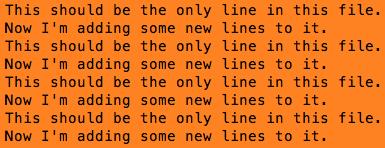
Now that's c00l.
It's easy to use this feature a lot, but beware: it's also easy to make a LARGE data space.
Another c00l thing we can do is print only certain lines, such as line 1 to line 50.
For this we need to introduce another of Perl's 'Special Variables' $.
- $. Perl's Current Record Number, usually line # of the last filehandle read from.
For this next script I'm going to use a file I have with several hundred lines of text. It's a list of jazz artists, CD titles, and tracks I have.
#! /usr/bin/perl
use strict;
use warnings;
BEGIN
{
	open (STDERR,">> $0.txt");
	print STDERR "\n", scalar localtime, "\n";
}
my $File="JazzA.txt";
my $Artist;
my $Want=6;
my $count=0;
my $pat = "/";
my $StartLine=611;
print "\n"x2;
open (my $FILE,"<",$File) or die "Can't open $File: $!\n";
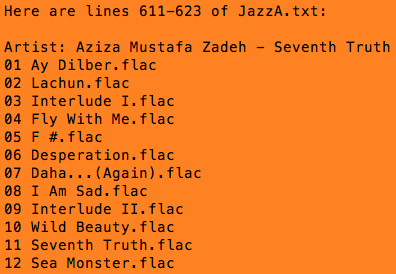
print qq{\nHere are lines 611-623 of $File:\n};
while (<$FILE>) {
    chomp;
    if ($. == $StartLine) {
        while (/$pat/gi) {
            if (++$count == $Want) {
                $Artist=((split $pat)[$Want]);
                print qq{Artist: $Artist\n}; # if ($. == 611);
            }
        }
    }
    for my $i(612..623) {
        print qq{$_\n} if ($. == $i)
    }
}
close $FILE;
Here's what the actual text looks like in the file:
/Volumes/Backup/MouthBreather/Plex/Jazz/Aziza Mustafa Zadeh - Seventh Truth
01 Ay Dilber.flac
02 Lachun.flac
03 Interlude I.flac
04 Fly With Me.flac
05 F #.flac
06 Desperation.flac
07 Daha...(Again).flac
08 I Am Sad.flac
09 Interlude II.flac
10 Wild Beauty.flac
11 Seventh Truth.flac
12 Sea Monster.flac
img173.jpg
img174.jpg
img175.jpg
And here is what the script produces: